How to Find a Product's ID

Find a product's ID in the last part of its page URL in your Shopify admin, for imports or widget setup.


To find a product's ID, follow the steps below:

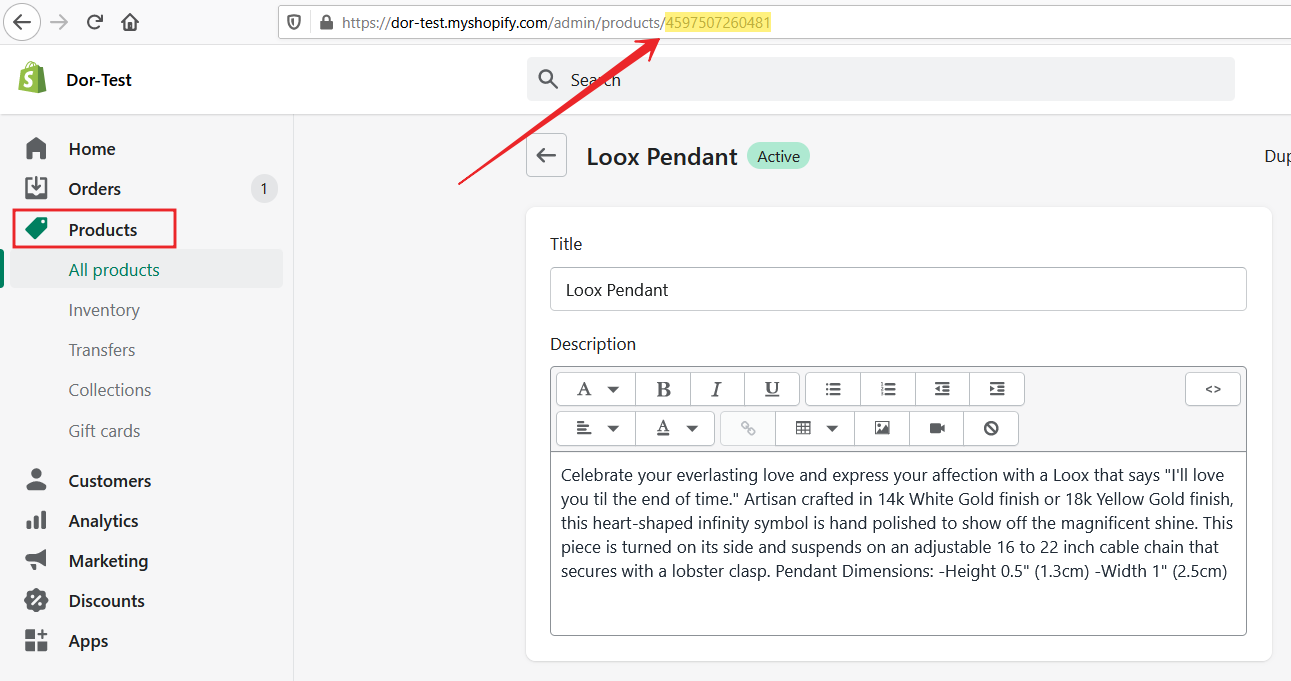
  1. Go to the Products tab of your Shopify admin.
  2. Click the product whose ID you would like to find.
  3. The product's ID is the series of numbers that are the last part of this page's URL:Shopify product page URL with the product ID at the end highlighted

Was this article helpful?

That’s Great!

Thank you for your feedback

Sorry! We couldn't be helpful

Thank you for your feedback

Let us know how can we improve this article!

Select at least one of the reasons
CAPTCHA verification is required.

Feedback sent

We appreciate your effort and will try to fix the article

Have more questions? Contact support

Still need a hand?

Our support team is available 24/7.